
Now Multiple Authors Can Create Articles:
You can now create or collaborate with multiple authors,Especially when you are working with teams. Each author will have a unique page of her written articles also her profile widget in Articles written by his/her.
For this every Author needs to have a unique username (without space) For eg. If Author is John Doe - the username should be johndoe or john-doe (without space).This key will be used by devlopr, to fetch individual author’s profile pages internally.
Configuring Authors :
Under _authors folder create a author details file (username.md) with his/her username (as described above). For eg. johndoe.md.
Then add this frontmatter to describe the author in johndoe.md.
---
name: John Doe # Name of the Author
username: johndoe # Username of the Author
bio: "Hi I a John, a Web Developer and Designer." # Author Bio
site: http://johndoe.com  # Author Website URL
avatar: johndoe.png  # Profile Image (img path will be /assets/img/authors/johndoe.png)
email: mail@johndoe.com  # Author Email address
social:  # Author Social profile links
    - title: "github"
      url: "https://github.com/johndoe"
    - title: "linkedin"
      url: "https://www.linkedin.com/in/johndoe"
    - title: "youtube"
      url: "https://www.youtube.com/channel/UCSfLBFFfNU9r6ihfei6VeJw"
    - title: "facebook"
      url: "https://www.facebook.com/johndoe"
    - title: "twitter"
      url: "https://www.twitter.com/johndoe"
    - title: "behance"
      url: "https://behance.com/johndoe"
    - title: "instagram"
      url: "https://instagram.com/johndoe"
    - title: "medium"
      url: "https://medium.com/johndoe"
    - title: "telegram"
      url: "https://telegram.com/johndoe"
    - title: "dribbble"
      url: "https://dribbble.com/johndoe"
    - title: "flickr"
      url: "https://flickr.com/johndoe"
---
You can create multiple authors similarly under _authors
Next, copy the same frontmatter in _data/authors.yml (under individual author usernames) like this :
# Author 1
johndoe:
   name: John Doe
   username: johndoe
   site: http://johndoe.com
   avatar: johndoe.png
   bio: "Hi I a John, a Web Developer and Designer."
   email: mail@johndoe.com
   social:
      - title: "github"
        url: "https://github.com/johndoe"
      - title: "linkedin"
        url: "https://www.linkedin.com/in/johndoe"
      - title: "youtube"
        url: "https://www.youtube.com/channel/UCSfLBFFfNU9r6ihfei6VeJw"
      - title: "facebook"
        url: "https://www.facebook.com/johndoe"
      - title: "twitter"
        url: "https://www.twitter.com/johndoe"
      - title: "behance"
        url: "https://behance.com/johndoe"
      - title: "instagram"
        url: "https://instagram.com/johndoe"
      - title: "medium"
        url: "https://medium.com/johndoe"
      - title: "telegram"
        url: "https://telegram.com/johndoe"
      - title: "dribbble"
        url: "https://dribbble.com/johndoe"
      - title: "flickr"
        url: "https://flickr.com/johndoe"

# Author 2
janedoe:
   name: Jane Doe
   username: janedoe
   site: https://janedoe.com
   avatar: jane.png
   bio: "Designer"
   email: mail@janedoe.com
   social:
      - title: "github"
        url: "https://github.com/janedoe"
      - title: "linkedin"
        url: "https://www.linkedin.com/janedoe"
      - title: "youtube"
        url: "https://www.youtube.com/channel/UCSfLBFFfNU9r6ihfei6VeJw"
      - title: "facebook"
        url: "https://www.facebook.com/janedoe"
Likewise ! This will be helpful for the widgets. (About Author, Recent Articles).
Adding Author to Post
When creating a new post, just add the author in frontmatter using the username of the author
For eg, In 2020-10-24-demo-article.md
---
layout: post
title: "Demo Article"
author: janedoe
---
This is Jane Doe's Article
Now there will be Authors widget in Blog Sidebar, showing all authors like this :
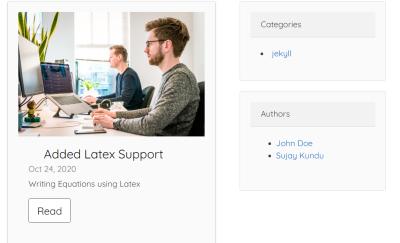
Also a Author Profile Page will be created for Jane Doe to showcase her written articles.
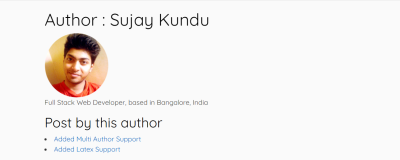
Also, below this article you can see the Author Profile Card , who has written the article too ! ;)
Cheers ! Hope You enjoy this new feature. :D
