
Now that vCenter is installed and configured, I am ready to move onto the installation of NSX. NSX for vCloud Director (vCD) is a tad simpler installation than implementing a standard NSX deployment for vSphere. Luckily, the good folks over at SysadminTutorials have a most excellent walkthrough on NSX for vCloud Director. Networking is my Achilles heel, so I struggle with it. When I write about networking, I will try and detail out areas that are confusing to me.
For my environment, I have installed the following components:
- vSphere 6.5 (vCenter & ESX 6.5)
- NSX 6.3.5
 | TIP JAR I followed the Sysadmin Tutorial to perform the NSX installation in my lab. This tutorial was spot on (even for version 6.3.5), however, there are some things to note regarding the installation for my environment. |
|---|---|
| Placement: | Remember, in my environment the vCenter manages the compute cluster. The NSX Manager will be installed on the management host next to the vCenter server. When I deploy the NSX controllers, each controller will be installed in the compute cluster – not the management host (as the tutorial suggests). |
| NSX Controller IP Pool: | For me, I consider the NSX Controllers an extension of the management plane. I also realized that I would only be installing two controllers. This goes against best practice and the recommended ‘three’ from VMware. Therefore, the IP Pool I created for my controllers was a pool of two IP addresses. During the install, I assigned a controller to each host within the compute cluster. |
| VXLAN IP Pool: | When configuring VXLAN (steps 32-36), I again only created a pool of two IP Addresses for each of my ESX hosts within the compute cluster. Since these are VMKernel NICs on the ESX hosts, I kept them on the management network. |
| MTU Size: | I cannot stress enough how important this is. If you can create Jumbo Frames throughout the environment, you will be saving yourself from heartache. The MTU setting that is absolutely required for NSX is 1600. But if you are going to implement jumbo frames, go all the way and give it 9000. In my experience, I’ve seen this be the issue that killed connectivity and created fragmentation where it didn’t need to be, among other things. On one of my previous engagements, the customer utilized an encrypted Active Directory. During a domain join, I would have machines throw errors. When we troubleshot, what we found was that the encrypted traffic could not be fragmented. The packet size was 1538, MTU was 1500 on their network. This authentication packet was tossed out every single time preventing the machines from joining the domain. This is just one example where this has shown its’ ugly face. My recommendation: check from end-to-end that your MTU is set appropriately. |
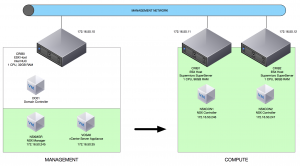
After the installation of NSX, this is what my environment looks like. The green is to indicate that the vCenter is managing the Compute Resources. As you can see, it is a simple installation so far.
Up next, I will build a CentOS machine and install the vCloud Director Cell.
