Genuine NUMA Boot Error

Posted by : on

Category : esx   vmware   troubleshooting


My co-worker ran into this error this week - “TSC: 54606870 cpu0:0) NUMA: 706: Can’t boot system as genuine NUMA. Booting with 1 fake node(s)”. He was upgrading a Dell PowerEdge 6850 from ESX 3.5 Update 5 to ESX 4.0 Update 2. He was wiping the machine and doing a fresh install, so this not an upgrade installation. After the installation completed and he booted it up, it generated an error similiar to what’s pictured.

I knew the issue involved the CPU as I just read an article concerning NUMA just the day before. I did a little research on my end and found a link to the Dell PowerEdge 6850’s ReleaseNotes PDF. The error can be ignored as it will not interfere with the functions of the ESX OS.

Unfortunately, the error looks scarey and will not fly within our environment. Upper management will not like seeing an error on the screen if they do a pop inspection. So the $64,000 question is “How do you get rid of it?” Another google search and minutes later, I found the solution.

1) Use the vSphere Client to connect to the vCenter 2) Left-click on the ESX server 3) Click the Configuration tab 4) (Under Software) Click Advanced Settings 5) In the new window that pops up, locate and click on Vmkernel 6) Over on the right-hand side of the window, locate vmkernel.boot.usenumainfo (It should be the 8th entry from the bottom of list) and uncheck vmkernel NUMA Setting NUMA
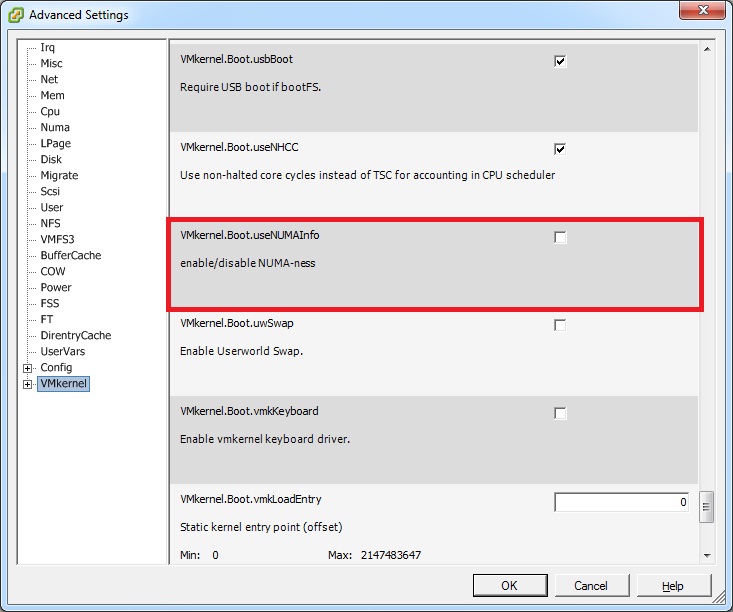
7) Reboot the ESX host (Don’t forget to put into maintenance mode and evac the VMs)


About Sam Aaron
Sam Aaron

Father, Husband, Geek. Workaholic.

Email : mail@micronauts.us

Website : http://micronauts.us

About Sam Aaron

Father. Husband. Geek. Workaholic. US Marine Corps Veteran.

Sam Aaron is a Senior Consultant in the Professional Services Organization for Entelligence, bringing over a decade of expertise in enterprise cloud automation and infrastructure. Sam has spent almost eleven years at VMware leading cloud automation initiatives using VCF Automation (formerly Aria Automation & vRA) and designing scalable, multi-tenant environments with VMware Cloud Director (vCD).

Sam holds multiple certifications including VCF-Architect 2024, VCIX-CMA, and dual VCPs (DCV & CMA), and is a recognized contributor to VMware’s certification exams. As a VMware Hands-On Lab (HOL) Captain and content author from 2015-2025, Sam played a key role in educating and mentoring the global VMware community. He helped to create and develop the automation challenge and troubleshooting labs for VMworld and global virtual forums.

When Sam is not working, he has several hobbies, among these are 3D printing Star Wars robots and turning them into animatronics.

Launched in April 2010, micronauts is Sam's online presence. Here, he has been blogging and sharing knowledge with the virtualization community. This blog acts as a central repository to retain the resolutions and other trivial knowledge that Sam has discovered.

** No information provided here was reviewed or endorsed by VMware by Broadcom, Microsoft, or anyone else for that matter. All information here are opinions based on Sam's personal experience. Use this knowledge at your own risk. **

Star
Useful Links