How to P2V linux into VMware ESX Server

Posted by : on

Category : howto   p2v   linux


I stumbled on this article a while back and stored it on a thumb drive. The original article was posted by Vladan Seget. It can be found here. If you do a lot of P2V conversions, I would recommend giving this a read over.

The steps you need to do: 01.) Download Vmware Converter for linux here. 02.) Extract the converter package on your linux server:

  • # tar xf VMware-converter-4.0.3-u4.tar.gz

03.) Start the installation

  • # cd vmware-converter-distrib/ && ./vmware-install.pl

04.) You can just accept the majority of the options just make sure that you activate the remoteaccess

  • Do you want to enable remote access in Converter Standalone Server? yes

05.) Usually a linux server has an Apache installed on port 80, so good think to do is to add aditional port for http proxy :

  • What port do you want the HTTP proxy to use? [80] 8080
  • What port do you want the HTTPS proxy to use? [443] 444

06.) Also you should go and allow root to login localy

  • #vi /etc/ssh/sshd_config

change the line

  • PermitRootLogin yes

07.) Then you just leave your linux server and go to your Windows XP or Vista Workstation and connect to your linux server remotely via http for example “http://192.168.0.1:444” 08.) Download and install the VMware Converter client. 09.) Start the Converter Client and go to Administration > Connect to another server
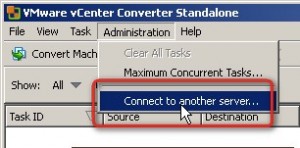
1

10.) In the credentials window just enter the IP address followed by the port number, then the root login and password.
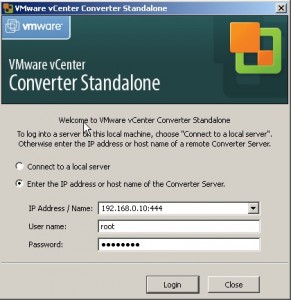
2

11.) Enter the credentials once more and choose Linux as an OS family.
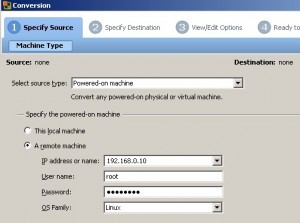
3

12.) Then just follow the assistant for the rest of the steps. As a destination you choose the ESX server IP address or hostname. There is nothing difficult with that…


About Sam Aaron
Sam Aaron

Father, Husband, Geek. Workaholic.

Email : mail@micronauts.us

Website : http://micronauts.us

About Sam Aaron

Father. Husband. Geek. Workaholic. US Marine Corps Veteran.

Sam Aaron is a Senior Consultant in the Professional Services Organization for Entelligence, bringing over a decade of expertise in enterprise cloud automation and infrastructure. Sam has spent almost eleven years at VMware leading cloud automation initiatives using VCF Automation (formerly Aria Automation & vRA) and designing scalable, multi-tenant environments with VMware Cloud Director (vCD).

Sam holds multiple certifications including VCF-Architect 2024, VCIX-CMA, and dual VCPs (DCV & CMA), and is a recognized contributor to VMware’s certification exams. As a VMware Hands-On Lab (HOL) Captain and content author from 2015-2025, Sam played a key role in educating and mentoring the global VMware community. He helped to create and develop the automation challenge and troubleshooting labs for VMworld and global virtual forums.

When Sam is not working, he has several hobbies, among these are 3D printing Star Wars robots and turning them into animatronics.

Launched in April 2010, micronauts is Sam's online presence. Here, he has been blogging and sharing knowledge with the virtualization community. This blog acts as a central repository to retain the resolutions and other trivial knowledge that Sam has discovered.

** No information provided here was reviewed or endorsed by VMware by Broadcom, Microsoft, or anyone else for that matter. All information here are opinions based on Sam's personal experience. Use this knowledge at your own risk. **

Star
Useful Links