
Recently, I had to install ESXi 4.1 on an IBM x3850 X5. Once the install was completed and I started configuring the host, I noticed something odd. I had a new vswitch and a network adapter that was defined as vusb0.
WTF? At first, I thought I was imagining things. I opened the network adapters view, and sure enough there it was. I thought how could this be. Of course, I’ve never seen this before, so a little googling was in order. Lo and behold, I found this little jewel (VMware Forum Post: “Extra NICs showing up as vusb?”). Apparently, this is something that seems to be common with the IBM uEFI BIOS and ESX/ESXi4 and can cause issues with the console and the vmkernel (as referenced here from VMFAQ).
Here’s how to fix it.
Option A) Follow these instructions: (This is what I did to correct)
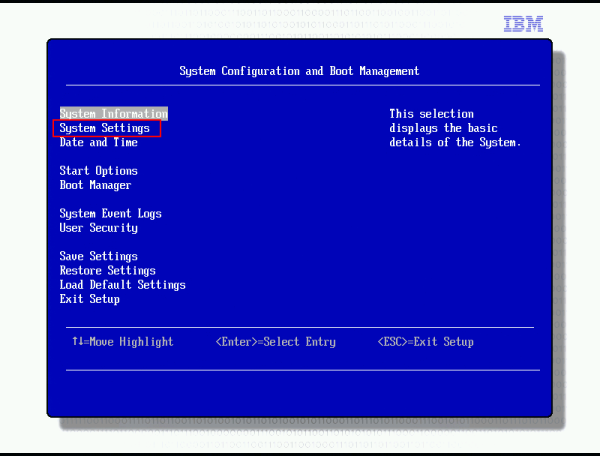
- Boot into the BIOS, then select “System Settings”.
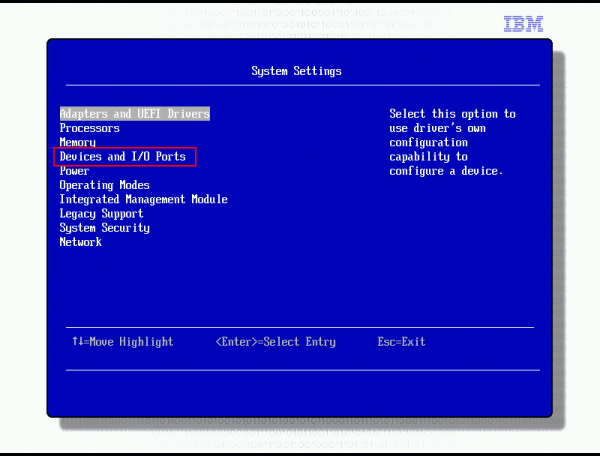
- Select “Devices and I/O Ports”.
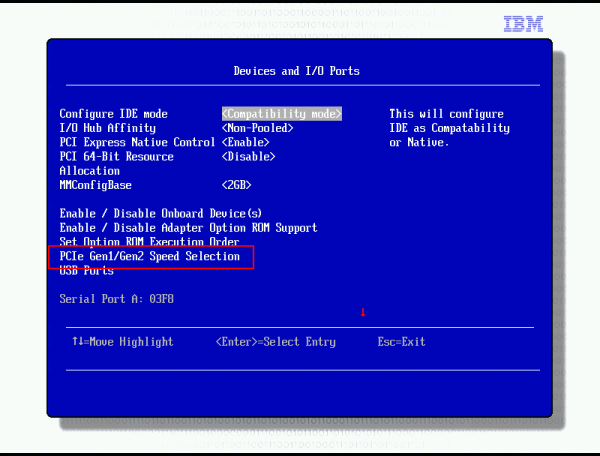
- Locate “PCIe Gen1/Gen2 Speed Selection” and set the speed to “Gen1”.
- Save the setting change and reboot.
or
Option B) Update the BIOS to version 1.03 or newer. I grabbed this from L. Troen’s blog, VMFAQ.
Updating the uEFI BIOS can be done as follows:
- Put the host in maintenance mode
- Put the new uefi bios file somewhere on the local file system of the service console (will not run from vmfs)
- Run the command: ./ibm_fw_uefi_d6e128a_linux_32-64.bin -u
- It will fail with the message “Error flashing firmware: 3”
- Run the same command again: ./ibm_fw_uefi_d6e128a_linux_32-64.bin -u
- This time it flashed successfully.
- This install creates a new virtual switch named IBM_CDC_vSwitch0. This will break VMware HA so you should remove it before leaving maintenance mode.
- If you didn’t enter maintenance mode before flashing, this new virtual switch (the one that breaks HA) will not be visible until you reboot the host.
Note: With newer BIOS revisions, you do not need to run the BIOS update command twice.
