Self-Service Training Labs with vRealize Orchestrator and VCD
A vRO-based VCD Service Library that lets instructors self-serve entire classrooms of training labs.
One of the recurring bottlenecks in running hands-on classes has been lab setup: someone technical has to manually spin up the right VMs before every class, for every student. The goal was to hand that responsibility to our instructors directly, without requiring them to understand vCloud Director at all.
The result is a VCD Service Library built on vRealize (Aria) Orchestrator 8.18, targeting a vCloud Director 10.6.1 environment. Under the hood it’s a JavaScript action library with modular actions for session handling, catalog lookups, vApp instantiation, task polling, and post-deployment network validation. Each action returns a Properties object so the workflow stays composable rather than one giant script.
On top of that library sits a base “Deploy Training Labs” workflow that instantiates a single vApp from a chosen catalog item, waits for the task to complete, and then validates that the resulting network configuration (fencing, NAT, firewall rules) matches what the class actually needs.
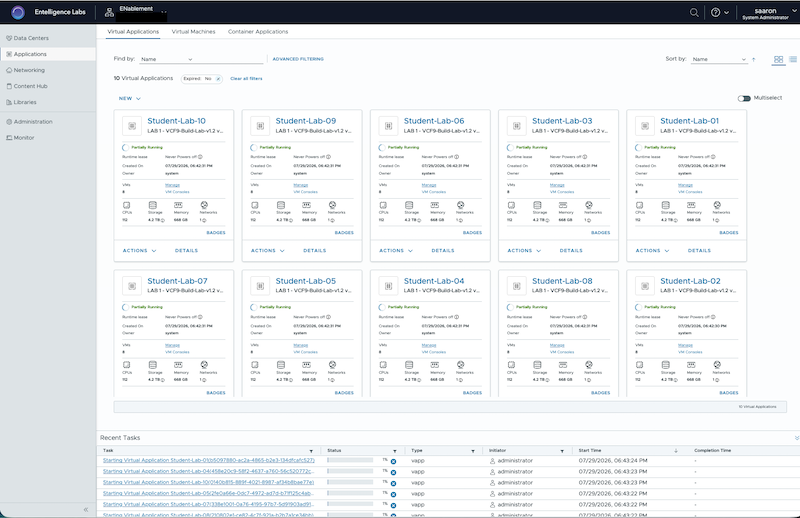
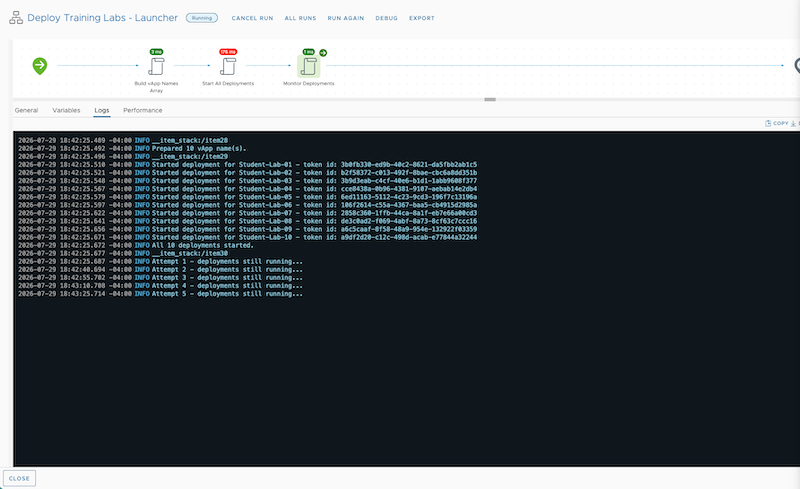
The instructor-facing piece is a launcher workflow that wraps the base workflow in a loop: build an array of vApp names, kick off a deployment for each one, then poll until every token reports back. In the test run below, it built and monitored ten simultaneous vApp deployments (Student-Lab-01 through Student-Lab-10) from a single click, with each one landing correctly in the training organization.
There are currently four labs available in the shared catalog, with more on the way. Once the presentation layer picks up the remaining loose ends, an instructor will be able to pick a lab, set a class size of up to ten students, and let the workflow handle the rest.