VCF 9.1 Bug Alert: Log Store
A known VCF 9.1 bug where a graceful VCF Management Services restart leaves log-store-0 uncreated - surfacing as a 500 error in the VCF Operations Fleet UI and a CrashLoopBackOff in ops-logs - the workaround VMware Engineering walked us through, why it's due to be fixed in 9.1.1, and how it now gets folded into the management domain startup automation via Posh-SSH.

Bringing a VCF 9.1 management domain back up after a graceful restart, VCF Operations for Logs (formerly Log Insight) came up unhealthy. Everything else in the domain - SDDC Manager, NSX, VCF Operations, VCF Management Services itself - reported healthy. Log Insight just sat there cycling. Working with the VMware Business Unit, it turned out to be a known bug, and they walked us through a workaround while a permanent fix makes its way through the pipeline.
The Symptom
The first sign is usually right in the VCF Operations UI, before anyone thinks to SSH anywhere. Under Fleet, open Build > Software Depot or Build > Lifecycle, and instead of the expected page you get a bare internal error:
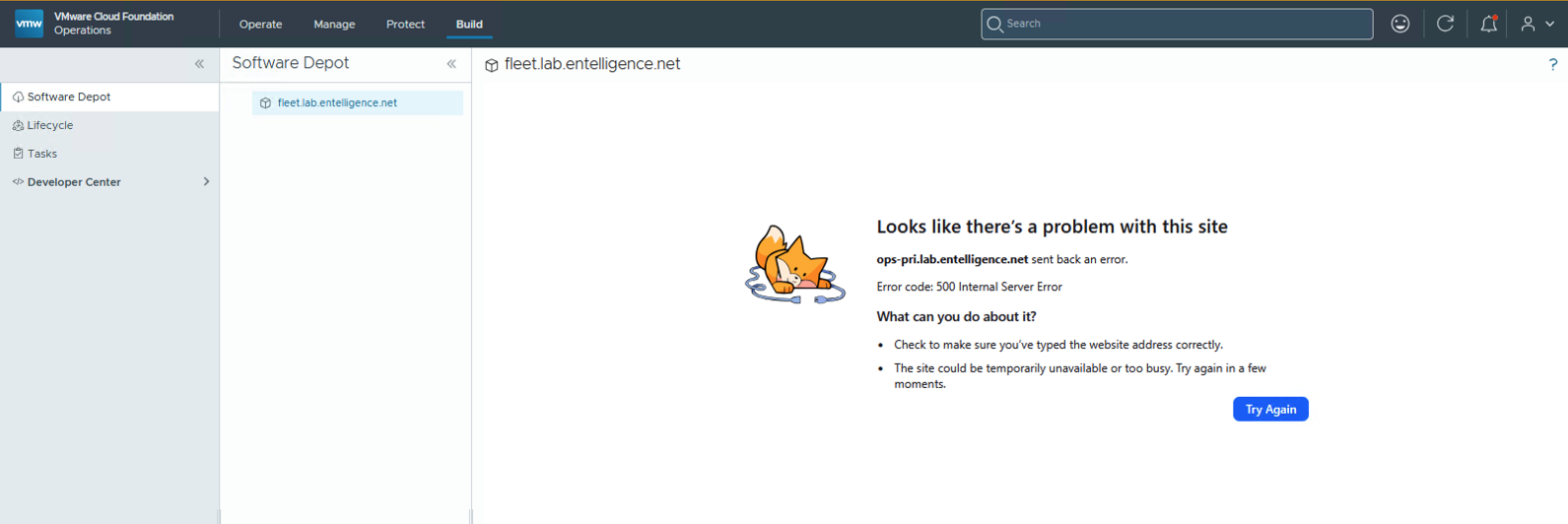 ops-pri.lab.net sent back an error - Error code: 500 Internal Server Error
That 500 is what actually gets noticed first in practice - it shows up as soon as someone opens Fleet after a restart, well before anyone goes looking at pods. It’s downstream of the same root cause as the pod-level symptom: the Fleet-facing services in VCF Operations can’t do their job while ops-logs is unhealthy underneath them.
Confirming the underlying cause means SSHing into the controller VM and checking the ops-logs namespace:
1
# kubectl get pods -n ops-logs
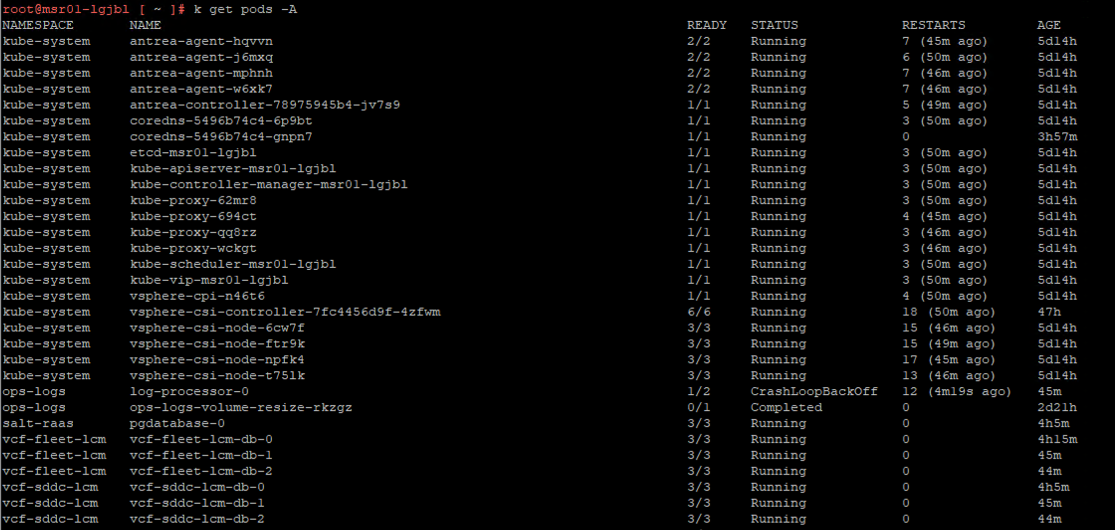 log-processor-0 in CrashLoopBackOff - log-store-0 doesn’t even appear in the list
log-processor-0 shows CrashLoopBackOff, and log-store-0 is missing entirely - not crashing, not pending, just never created. log-processor-0 depends on log-store-0 to do anything useful, so without it, the whole pod just keeps restarting and failing.
The root cause: after VCF Management Services is gracefully shut down and then restarted, there’s a condition that prevents the platform from recreating the log-store-0 pod. Since VCF Operations for Logs depends on it entirely, the product never gets past that missing piece - and the Software Depot / Lifecycle 500 is the visible fallout in the UI.
This is a known issue on Broadcom’s side, targeted to be fixed in VCF 9.1.1. No release date has been published yet, so this is a workaround, not a permanent fix:
- Internal tracking: (Broadcom internal JIRA - requires Broadcom/VMware SSO access to view)
The Fix
The recovery script itself - cluster-manual-recovery.sh - comes from Broadcom KB 440862. The exact diagnostic sequence below is what VMware Engineering walked us through directly for this specific ops-logs failure signature:
- SSH into the controller VM as
vmware-system-user. - Elevate to root:
sudo -i. - Set the kubeconfig:
export KUBECONFIG=/etc/kubernetes/admin.conf. - Alias kubectl for convenience:
alias k=kubectl. - Confirm the platform is otherwise alive:
k get machine -A- all four machines should show aRunningphase. - Check for the power-off-marker configmap:
k get configmap power-off-marker -n vmsp-platform. If it’s missing, stop - that’s outside this known issue and needs to go to Broadcom GSS. - Confirm the exact bug signature:
kubectl get pods -n ops-logsshould showlog-processor-0inCrashLoopBackOffwithlog-store-0absent. If it doesn’t match that signature, stop and escalate to GSS instead of running the recovery script blind. - Run the recovery script:
/home/vmware-system-user/cluster-manual-recovery.sh.
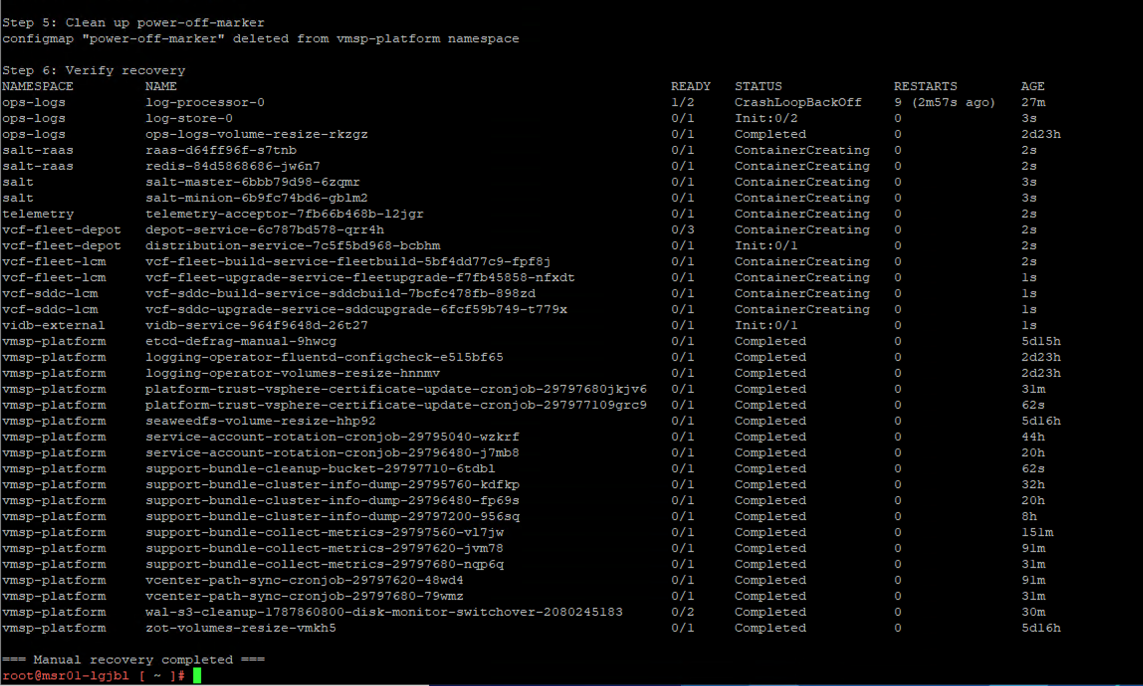 cluster-manual-recovery.sh mid-run on the controller VM
- Validate:
k get pods -n ops-logsshould now showlog-processor-0Running, andlog-store-0should exist and also beRunning.
 log-processor-0 and log-store-0 both Running after the recovery script completes
Once the script ran, the cluster caught up on its own shortly after - log-store-0 got created, and log-processor-0 stopped crash-looping.
Why This Needed Posh-SSH
Everything else in our VCF 9.1 management domain startup automation talks to VCF over REST - the vCenter Appliance health API, the NSX Manager cluster status API, and the Fleet LCM API that Step 7 (VCF Management Services) already uses to confirm the VCF services runtime is healthy. None of that surface can SSH into a node, elevate, and run a shell script. The nine-step procedure above is fundamentally an interactive SSH workflow, and that meant the startup script needed an actual SSH client.
Rather than shelling out to plink.exe or requiring the Windows OpenSSH client on whatever machine runs the automation, this pulled in Posh-SSH, a pure PowerShell SSH/SFTP module - checked for and installed on demand via the same Assert-ModuleAvailable helper 00-Common.ps1 already uses for every other optional dependency, so nothing needed to change about how the toolkit manages prerequisites.
One deliberate design choice worth calling out: rather than driving an interactive PTY/expect-style SSH session - fragile to script reliably against shell-prompt screen-scraping - each remote step is sent as a single non-interactive command of the shape echo "<password>" | sudo -S -p "" bash -c "<script>". sudo -S reads exactly one line (the password) from stdin and runs the given script as root, no PTY needed. The tradeoff is that this assumes sudo isn’t configured with requiretty for the account in question - more on that below.
Folding the Fix Into Startup Automation
This slots into Invoke-Step07-StartVCFManagementServices, right between the five-minute settle pause after the worker nodes power on and the existing wait for Fleet Manager to come online.
First, a small helper for safely nesting the sudo password and the remote script text inside a single-quoted shell argument:
1
2
3
4
5
6
7
8
9
10
function Protect-S1SingleQuoted {
    <#
        Standard POSIX trick to safely nest arbitrary text inside a
        single-quoted shell argument: close the quote, emit a literal quote
        via backslash-escape (outside any quoting), then reopen the quote.
        i.e. every ' becomes '\''
    #>
    param([Parameter(Mandatory)][AllowEmptyString()][string]$Value)
    return $Value.Replace("'", "'\''")
}
The core SSH runner - one non-interactive root command per call, using the same credentials for the initial SSH login and for sudo -S elevation, matching the documented manual workaround where both the SSH login and sudo -i use the same password:
1
2
3
4
5
6
7
8
9
10
11
12
13
14
15
16
17
18
19
20
21
22
23
24
25
26
27
28
29
30
31
32
33
34
35
36
37
38
39
40
41
42
43
function Invoke-S1SshRootCommand {
    <#
        Runs a single non-interactive bash script as root on a remote host
        over SSH, using the same credentials for the initial SSH login and
        for 'sudo -S' elevation (matches the documented manual workaround,
        where both the SSH login and 'sudo -i' use the same password).

        Requires the Posh-SSH module (installed for the current user
        automatically if missing).
    #>
    param(
        [Parameter(Mandatory)][string]$ComputerName,
        [Parameter(Mandatory)][string]$SshUsername,
        [Parameter(Mandatory)][string]$SshPassword,
        [Parameter(Mandatory)][string]$SudoPassword,
        [Parameter(Mandatory)][string]$RemoteBashScript,
        [int]$ConnectionTimeoutSeconds = 30,
        [int]$CommandTimeoutSeconds = 600
    )

    Assert-ModuleAvailable -Name 'Posh-SSH'

    $secureSshPassword = ConvertTo-SecureString -String $SshPassword -AsPlainText -Force
    $sshCred = New-Object System.Management.Automation.PSCredential($SshUsername, $secureSshPassword)

    $session = $null
    try {
        $session = New-SSHSession -ComputerName $ComputerName -Credential $sshCred `
            -ConnectionTimeout $ConnectionTimeoutSeconds -AcceptKey -ErrorAction Stop

        $escapedSudoPassword = Protect-S1SingleQuoted $SudoPassword
        $escapedScript       = Protect-S1SingleQuoted $RemoteBashScript

        $remoteCommand = "echo '$escapedSudoPassword' | sudo -S -p '' bash -c '$escapedScript'"

        $result = Invoke-SSHCommand -SSHSession $session -Command $remoteCommand -TimeOut $CommandTimeoutSeconds -ErrorAction Stop
        return $result
    } finally {
        if ($session) {
            Remove-SSHSession -SSHSession $session -ErrorAction SilentlyContinue | Out-Null
        }
    }
}
Manual steps 5-7 - the read-only verification portion - become one remote bash script that checks all three conditions in a single SSH round-trip and echoes machine-parseable RESULT_* lines back for PowerShell to pick up:
1
2
3
4
5
6
7
8
9
10
11
12
13
14
15
16
17
18
19
20
21
22
23
24
25
26
27
28
29
30
31
32
33
34
35
36
37
38
39
40
41
42
43
44
45
46
47
48
49
50
51
52
53
54
55
56
57
58
59
60
61
62
63
64
65
66
67
68
function Test-S1OpsLogsRecoveryPrecheck {
    <#
        Read-only verification portion of the workaround (manual steps 5-7):
          - Confirms the platform's Machines are Running.
          - Checks for the 'power-off-marker' ConfigMap in vmsp-platform -
            its presence is what tells us this cluster went through a
            tracked power-off and that this workaround is in scope.
          - Checks ops-logs for the specific bug signature: log-processor-0
            in CrashLoopBackOff AND log-store-0 missing entirely.

        Returns a hashtable: NotReadyMachineCount / MarkerPresent / BugConfirmed
    #>
    param(
        [Parameter(Mandatory)][string]$ComputerName,
        [Parameter(Mandatory)][string]$SshUsername,
        [Parameter(Mandatory)][string]$SshPassword,
        [Parameter(Mandatory)][string]$SudoPassword
    )

    $script = @'
export KUBECONFIG=/etc/kubernetes/admin.conf
k() { kubectl "$@"; }

echo "----MACHINES----"
k get machine -A
NOT_READY=$(k get machine -A --no-headers 2>/dev/null | awk '{print $8}' | grep -vc '^Running$')

echo "----POWER-OFF-MARKER----"
if k get configmap power-off-marker -n vmsp-platform >/dev/null 2>&1; then
  MARKER_PRESENT=yes
else
  MARKER_PRESENT=no
fi

echo "----OPS-LOGS PODS----"
k get pods -n ops-logs
LOG_PROCESSOR_LINE=$(k get pods -n ops-logs --no-headers 2>/dev/null | grep '^log-processor-0[[:space:]]')
LOG_STORE_LINE=$(k get pods -n ops-logs --no-headers 2>/dev/null | grep '^log-store-0[[:space:]]')

if echo "$LOG_PROCESSOR_LINE" | grep -q 'CrashLoopBackOff' && [ -z "$LOG_STORE_LINE" ]; then
  BUG_CONFIRMED=yes
else
  BUG_CONFIRMED=no
fi

echo "RESULT_NOT_READY_MACHINES=$NOT_READY"
echo "RESULT_MARKER_PRESENT=$MARKER_PRESENT"
echo "RESULT_BUG_CONFIRMED=$BUG_CONFIRMED"
'@

    $result = Invoke-S1SshRootCommand -ComputerName $ComputerName -SshUsername $SshUsername `
        -SshPassword $SshPassword -SudoPassword $SudoPassword -RemoteBashScript $script `
        -CommandTimeoutSeconds 120

    foreach ($line in $result.Output) { Write-Step "  [controller] $line" }
    foreach ($line in $result.Error)  { Write-Step "  [controller] $line" -Level WARN }

    $notReady          = ($result.Output | Where-Object { $_ -match '^RESULT_NOT_READY_MACHINES=(\d+)' } | ForEach-Object { [int]$Matches[1] } | Select-Object -Last 1)
    $markerPresentText = ($result.Output | Where-Object { $_ -match '^RESULT_MARKER_PRESENT=(yes|no)' } | ForEach-Object { $Matches[1] } | Select-Object -Last 1)
    $bugConfirmedText  = ($result.Output | Where-Object { $_ -match '^RESULT_BUG_CONFIRMED=(yes|no)' } | ForEach-Object { $Matches[1] } | Select-Object -Last 1)

    return @{
        NotReadyMachineCount = if ($null -ne $notReady) { $notReady } else { -1 }
        MarkerPresent        = ($markerPresentText -eq 'yes')
        BugConfirmed         = ($bugConfirmedText -eq 'yes')
        ExitStatus           = $result.ExitStatus
    }
}
Notice this function only reports what it found - it doesn’t decide what to do about it. That decision lives in the orchestrator below, which is what actually gates the run.
Step 8 - running the vendor-provided script - checks first that it actually exists and is executable before trying to run it, rather than letting a typo’d path fail silently:
1
2
3
4
5
6
7
8
9
10
11
12
13
14
15
16
17
18
19
20
21
22
23
24
25
26
27
28
29
30
31
32
33
function Invoke-S1OpsLogsRecoveryScript {
    <#
        Runs the vendor-provided cluster-manual-recovery.sh as root on the
        controller VM (manual step 8).
    #>
    param(
        [Parameter(Mandatory)][string]$ComputerName,
        [Parameter(Mandatory)][string]$SshUsername,
        [Parameter(Mandatory)][string]$SshPassword,
        [Parameter(Mandatory)][string]$SudoPassword,
        [string]$RecoveryScriptPath = '/home/vmware-system-user/cluster-manual-recovery.sh'
    )

    $scriptTemplate = @'
export KUBECONFIG=/etc/kubernetes/admin.conf
if [ ! -x "__RECOVERY_SCRIPT_PATH__" ]; then
  echo "RESULT_SCRIPT_MISSING=yes"
  exit 1
fi
"__RECOVERY_SCRIPT_PATH__"
echo "RESULT_RECOVERY_EXIT_CODE=$?"
'@
    $script = $scriptTemplate.Replace('__RECOVERY_SCRIPT_PATH__', $RecoveryScriptPath)

    $result = Invoke-S1SshRootCommand -ComputerName $ComputerName -SshUsername $SshUsername `
        -SshPassword $SshPassword -SudoPassword $SudoPassword -RemoteBashScript $script `
        -CommandTimeoutSeconds 900

    foreach ($line in $result.Output) { Write-Step "  [controller] $line" }
    foreach ($line in $result.Error)  { Write-Step "  [controller] $line" -Level WARN }

    return $result
}
Step 9 turned out to need a genuine poll loop, not a single check. Lab testing showed that immediately after cluster-manual-recovery.sh completes, log-store-0 has only just been (re)created - still Init:0/1, a few seconds old - and log-processor-0 can keep showing CrashLoopBackOff for several more minutes while it waits on log-store to finish initializing:
1
2
3
4
5
6
7
8
9
10
11
12
13
14
15
16
17
18
19
20
21
22
23
24
25
26
27
28
29
30
31
32
33
34
35
36
37
38
39
40
41
42
43
44
45
46
47
48
49
50
51
52
53
54
55
56
57
58
59
60
61
62
63
64
function Wait-S1OpsLogsRecoveryHealthy {
    <#
        Polls ops-logs for log-processor-0 and log-store-0 to report Running
        (manual step 9). Confirmed via lab testing: immediately after
        cluster-manual-recovery.sh completes, log-store-0 has only just been
        (re)created (Init:0/1, a few seconds old) and log-processor-0 can
        still show CrashLoopBackOff for several more minutes while it waits
        on log-store to finish initializing - so this needs a genuine poll
        loop, not a single check right after the recovery script exits.
    #>
    param(
        [Parameter(Mandatory)][string]$ComputerName,
        [Parameter(Mandatory)][string]$SshUsername,
        [Parameter(Mandatory)][string]$SshPassword,
        [Parameter(Mandatory)][string]$SudoPassword,
        [int]$TimeoutSeconds = 1200,
        [int]$PollIntervalSeconds = 30
    )

    $script = @'
export KUBECONFIG=/etc/kubernetes/admin.conf
k() { kubectl "$@"; }
k get pods -n ops-logs
PROC_STATUS=$(k get pods -n ops-logs --no-headers 2>/dev/null | awk '$1=="log-processor-0"{print $3}')
STORE_STATUS=$(k get pods -n ops-logs --no-headers 2>/dev/null | awk '$1=="log-store-0"{print $3}')
echo "RESULT_LOG_PROCESSOR_STATUS=${PROC_STATUS:-Missing}"
echo "RESULT_LOG_STORE_STATUS=${STORE_STATUS:-Missing}"
'@

    Write-Step "Waiting for ops-logs (log-processor-0 / log-store-0) to report Running after recovery (timeout ${TimeoutSeconds}s)..."
    $sw = [Diagnostics.Stopwatch]::StartNew()
    $healthy = $false
    $lastProc = $null
    $lastStore = $null

    while ($sw.Elapsed.TotalSeconds -lt $TimeoutSeconds) {
        try {
            $result = Invoke-S1SshRootCommand -ComputerName $ComputerName -SshUsername $SshUsername `
                -SshPassword $SshPassword -SudoPassword $SudoPassword -RemoteBashScript $script `
                -CommandTimeoutSeconds 60

            foreach ($line in $result.Output) { Write-Step "  [controller] $line" }

            $lastProc  = ($result.Output | Where-Object { $_ -match '^RESULT_LOG_PROCESSOR_STATUS=(.+)$' } | ForEach-Object { $Matches[1] } | Select-Object -Last 1)
            $lastStore = ($result.Output | Where-Object { $_ -match '^RESULT_LOG_STORE_STATUS=(.+)$' } | ForEach-Object { $Matches[1] } | Select-Object -Last 1)

            if ($lastProc -eq 'Running' -and $lastStore -eq 'Running') {
                $healthy = $true
                break
            }
            Write-Step "  log-processor-0=$lastProc log-store-0=$lastStore - waiting..." -Level WARN
        } catch {
            Write-Step "  Failed to query ops-logs pod status via SSH: $($_.Exception.Message)" -Level WARN
        }
        Start-Sleep -Seconds $PollIntervalSeconds
    }

    if ($healthy) {
        Write-Step "ops-logs recovered: log-processor-0 and log-store-0 both report Running." -Level OK
    } else {
        Write-Step "Timed out after $TimeoutSeconds seconds waiting for ops-logs to recover (last observed: log-processor-0=$lastProc, log-store-0=$lastStore)." -Level WARN
        Confirm-ManualStep -Prompt "Manually verify VCF Operations for Logs is healthy (SSH to the controller VM, 'kubectl get pods -n ops-logs' - log-processor-0 and log-store-0 should both be Running) before continuing."
    }
}
Finally, the orchestrator ties all nine manual steps together and is the only piece that actually decides whether to proceed, stop, or escalate:
1
2
3
4
5
6
7
8
9
10
11
12
13
14
15
16
17
18
19
20
21
22
23
24
25
26
27
28
29
30
31
32
33
34
35
36
37
38
39
40
41
42
43
44
45
46
47
48
49
50
51
52
53
54
55
56
57
58
59
60
61
62
63
64
65
66
67
68
69
70
71
72
73
74
75
76
77
78
79
80
81
82
function Invoke-S1OpsLogsCrashLoopWorkaround {
    <#
        Orchestrates the full KB workaround (manual steps 1-9):
          1-4. SSH to the controller VM as $SshUsername, elevate to root via
               'sudo -S', export KUBECONFIG, alias k=kubectl (via a bash
               function - equivalent for scripting purposes).
          5.   Sanity-check the platform (Machines all Running) - logged as a
               warning only if not, since it isn't one of the two explicit
               gates below.
          6.   REQUIRE the 'power-off-marker' ConfigMap in vmsp-platform to be
               present. Its absence means this cluster did not go through a
               tracked power-off, which is outside the scope of this
               workaround - stop and engage GSS rather than guess.
          7.   REQUIRE the specific bug signature in ops-logs
               (log-processor-0 CrashLoopBackOff + log-store-0 missing)
               rather than assuming the bug occurred - if it isn't present,
               something else is going on and we stop rather than run a
               recovery script that may not be appropriate.
          8.   Run cluster-manual-recovery.sh as root.
          9.   Poll ops-logs until log-processor-0 and log-store-0 both
               report Running.

        Any deviation from the expected preconditions (missing marker, or
        ops-logs not showing the known bug signature) throws and stops the
        startup sequence, directing the operator to engage GSS.
    #>
    param(
        [Parameter(Mandatory)][string]$ControllerVMAddress,
        [Parameter(Mandatory)][string]$SshUsername,
        [Parameter(Mandatory)][string]$SshPassword,
        [Parameter(Mandatory)][string]$SudoPassword,
        [string]$RecoveryScriptPath = '/home/vmware-system-user/cluster-manual-recovery.sh',
        [int]$RecoveryHealthyTimeoutSeconds = 1200
    )

    $gssMessage = "This does not match the state the VCF Operations for Logs KB workaround expects. " +
                  "Do not run the manual recovery script blind - stop here and engage GSS to diagnose " +
                  "the ops-logs / vmsp-platform state on the controller VM ($ControllerVMAddress) before continuing."

    Write-Step "=== Applying KB workaround: VCF Operations for Logs post-restart recovery ==="

    $precheck = Test-S1OpsLogsRecoveryPrecheck -ComputerName $ControllerVMAddress `
        -SshUsername $SshUsername -SshPassword $SshPassword -SudoPassword $SudoPassword

    if ($precheck.NotReadyMachineCount -ne 0) {
        Write-Step "$($precheck.NotReadyMachineCount) platform Machine(s) are not reporting Running yet." -Level WARN
    } else {
        Write-Step "All platform Machines report Running." -Level OK
    }

    if (-not $precheck.MarkerPresent) {
        Write-Step "'power-off-marker' ConfigMap not found in vmsp-platform." -Level ERROR
        throw $gssMessage
    }
    Write-Step "'power-off-marker' ConfigMap is present - proceeding." -Level OK

    if (-not $precheck.BugConfirmed) {
        Write-Step "ops-logs does not show the known bug signature (log-processor-0 CrashLoopBackOff with log-store-0 missing)." -Level ERROR
        throw $gssMessage
    }
    Write-Step "Confirmed: log-processor-0 is in CrashLoopBackOff and log-store-0 is missing - applying recovery script." -Level WARN

    $recoveryResult = Invoke-S1OpsLogsRecoveryScript -ComputerName $ControllerVMAddress `
        -SshUsername $SshUsername -SshPassword $SshPassword -SudoPassword $SudoPassword `
        -RecoveryScriptPath $RecoveryScriptPath

    if ($recoveryResult.Output -match 'RESULT_SCRIPT_MISSING=yes') {
        Write-Step "Recovery script not found or not executable at '$RecoveryScriptPath' on $ControllerVMAddress." -Level ERROR
        throw $gssMessage
    }

    $recoveryExitText = ($recoveryResult.Output | Where-Object { $_ -match '^RESULT_RECOVERY_EXIT_CODE=(\d+)' } | ForEach-Object { $Matches[1] } | Select-Object -Last 1)
    if ($recoveryExitText -and $recoveryExitText -ne '0') {
        Write-Step "cluster-manual-recovery.sh exited with code $recoveryExitText." -Level WARN
    }

    Wait-S1OpsLogsRecoveryHealthy -ComputerName $ControllerVMAddress `
        -SshUsername $SshUsername -SshPassword $SshPassword -SudoPassword $SudoPassword `
        -TimeoutSeconds $RecoveryHealthyTimeoutSeconds

    Write-Step "=== KB workaround complete ===" -Level OK
}
And the updated Invoke-Step07-StartVCFManagementServices, with the workaround wired in right after the settle pause:
1
2
3
4
5
6
7
8
9
10
11
12
13
14
15
16
17
18
19
20
21
22
23
24
25
26
27
28
29
30
31
32
33
34
35
36
37
38
39
40
41
42
43
44
45
46
47
48
49
50
51
52
53
function Invoke-Step07-StartVCFManagementServices {
    param(
        [Parameter(Mandatory)][string[]]$ControlNodeVMNames,
        [Parameter(Mandatory)][string[]]$WorkerNodeVMNames,
        [Parameter(Mandatory)][string]$FleetLcmServer,
        [Parameter(Mandatory)][string]$FleetLcmUsername,
        [Parameter(Mandatory)][string]$FleetLcmPassword,
        [Parameter(Mandatory)][string]$OpsLogsControllerVMAddress,
        [Parameter(Mandatory)][string]$OpsLogsSshUsername,
        [Parameter(Mandatory)][string]$OpsLogsSshPassword,
        [Parameter(Mandatory)][string]$OpsLogsSudoPassword,
        [string]$OpsLogsRecoveryScriptPath = '/home/vmware-system-user/cluster-manual-recovery.sh',
        [switch]$SkipOpsLogsWorkaround
    )

    Write-Step "=== Step 7: Start VCF Management Services ==="

    # Power on the control node(s) first
    Start-VMsAndWait -VMNames $ControlNodeVMNames

    # Then power on the worker node(s)
    Start-VMsAndWait -VMNames $WorkerNodeVMNames

    # Pause for all VCF Fleet Services to come online
    Start-Sleep -Seconds 300

    # --- KB workaround (see Invoke-S1OpsLogsCrashLoopWorkaround above): VCF Operations
    #     for Logs can fail to (re)create its log-store pod after a graceful restart of
    #     the Management Domain, leaving the whole ops-logs deployment stuck in
    #     CrashLoopBackOff. Confirmed bug, fixed in the not-yet-released VCF 9.1.1;
    #     documented interim workaround applied here. Throws (stopping the sequence) if
    #     the platform isn't in the exact state this workaround expects. Once 9.1.1 is
    #     installed, pass -SkipOpsLogsWorkaround to Invoke-Step07-StartVCFManagementServices
    #     to bypass this entirely.
    if ($SkipOpsLogsWorkaround) {
        Write-Step "Skipping ops-logs KB workaround (per -SkipOpsLogsWorkaround)." -Level WARN
    } else {
        Invoke-S1OpsLogsCrashLoopWorkaround `
            -ControllerVMAddress $OpsLogsControllerVMAddress `
            -SshUsername         $OpsLogsSshUsername `
            -SshPassword         $OpsLogsSshPassword `
            -SudoPassword        $OpsLogsSudoPassword `
            -RecoveryScriptPath  $OpsLogsRecoveryScriptPath
    }

    # Wait for Fleet Manager to come ONLINE
    Write-Step "Waiting for Fleet Manager to report ONLINE..." -Level OK
    $accessToken = Get-S1FleetLcmAccessToken -Server $FleetLcmServer -Username $FleetLcmUsername -Password $FleetLcmPassword
    Write-Step "Fleet Manager is ONLINE." -Level OK

    # Wait for automated health confirmation via the Fleet LCM API
    Wait-S1VcfManagementServicesHealthy -Server $FleetLcmServer -Username $FleetLcmUsername -Password $FleetLcmPassword
}
Invoke-Step07-StartVCFManagementServices picked up four new required parameters - OpsLogsControllerVMAddress, OpsLogsSshUsername, OpsLogsSshPassword, OpsLogsSudoPassword - plus an optional OpsLogsRecoveryScriptPath and a -SkipOpsLogsWorkaround switch, so the whole workaround can be turned off cleanly once the environment is actually running 9.1.1. In the wrapper’s $Config block, those look like:
1
2
3
4
5
6
7
$Config = @{
    # ...existing entries...
    OpsLogsControllerVMAddress = '10.1.1.72'
    OpsLogsSshUsername         = 'vmware-system-user'
    OpsLogsSshPassword         = '<PASSWORD>'
    OpsLogsSudoPassword        = '<PASSWORD>'
}
Both failure paths - a missing power-off-marker, or an ops-logs failure that doesn’t match this exact signature - throw the same GSS-escalation message, which propagates up through the existing catch blocks in the orchestrator scripts, so a run that hits an unrecognized failure still gets marked FAIL correctly instead of silently limping forward.
Before trusting this against a real pod, two things are worth calling out:
- Every inserted bash block was checked with
bash -nfor syntax, including the escapedsudo -S ... bash -c '...'one-liner it gets wrapped into, and run against mockkubectloutput for three cases: the exact bug signature, a missing power-off-marker, and an already-healthy cluster - all three produced the correct decision. - Non-interactive
sudo -Swill fail withsudo: sorry, you must have a tty to run sudoifrequirettyis set insudoersforvmware-system-useron your appliance. That wasn’t something this could be verified from a lab-testing pass alone, so it’s worth a dry run before relying on this in production - and if it does hit that wall, eitherrequirettyneeds to be relaxed for that account or the SSH runner needs a PTY-based approach substituted in.
Takeaways
- This is a known VCF 9.1 issue, not something environment-specific - Broadcom has it tracked internally and slated for a fix in 9.1.1, with no release date announced yet.
- In practice this gets noticed first as a 500 Internal Server Error in the VCF Operations UI under Build > Software Depot or Build > Lifecycle - if you see that after a management domain restart, it’s worth checking ops-logs before assuming it’s something else.
- The signature is specific:
log-processor-0inCrashLoopBackOffin theops-logsnamespace, withlog-store-0never created at all. The recovery script -cluster-manual-recovery.sh, sourced from KB 440862 - clears it, but only after confirming the power-off-marker configmap is present and the failure actually matches this known signature. - If you’re automating VCF 9.1 startup the way the companion post describes, this is worth detecting and self-healing automatically rather than finding out Log Insight is down after the fact - just budget for adding an SSH-capable module like Posh-SSH, since the fix itself isn’t reachable through any of VCF’s REST APIs.