VMware VirtualCenter Server Service hung on 'starting'
Howto fix the service when it has hung.
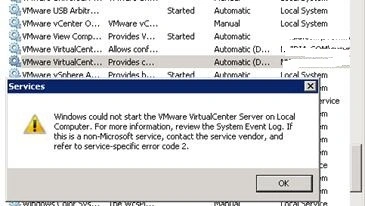
Discovered something interesting earlier today. I went to go work in vcenter and found that it was unresponsive. Thinking that the machine had recently “autoinstalled” a patch and rebooted. I first thought that maybe the vcenter service hadn’t started. I opened services.msc and found that the VMware VirtualCenter Server Service stuck on “starting”. I had no way to stop, or restart it. I rebooted the machine and hoped that the ‘universal’ fix would work – no gas.
Quick googling found little to no help, except one post. VMware KB Article: 1003926 discusses troubleshooting this type of scenario. While my symptoms did not fit into any symptoms posted in this KB, it did give me a possible lead. I opened %ALLUSERSPROFILE%\VMware\VMware VirtualCenter\Logs\vpxd.log and found the following entry at the bottom.
2013-05-29T15:33:48.208-04:00 [04088 warning ‘win32vpxdOsLayer_win32’] rax: 1932352763 rbx: 77063792 rcx: 77054864 –> rdx: 8928 rdi: 77060000 rsi: 77065376 –> r8: 0 r9: 0 r10: 5354881024 –> r11: 77056480 r12: 77067968 r13: 77061544 –> r14: 0 r15: 77056744 –> 2013-05-29T15:33:48.223-04:00 [04088 warning ‘win32vpxdOsLayer_win32’] [VpxUnhandledException] Backtrace –> backtrace[00] rip 000000018018a8ca –> backtrace[01] rip 0000000180102f28 –> backtrace[02] rip 000000018010423e –> backtrace[03] rip 000000014006604d –> backtrace[04] rip 00000000778d9460 –> backtrace[05] rip 0000000077af43b8 –> backtrace[06] rip 0000000077a785a8 –> backtrace[07] rip 0000000077a89d0d –> backtrace[08] rip 0000000077a791af –> backtrace[09] rip 0000000077a797a8 –> backtrace[10] rip 000007fefdb3bccd –> backtrace[11] rip 0000000075493bb8 –> backtrace[12] rip 0000000077ab0c21 –> backtrace[13] rip 000000013f58bc69 –> backtrace[14] rip 000000013f94e7a1 –> backtrace[15] rip 000000013f96c912 –> backtrace[16] rip 000000013f96e363 –> backtrace[17] rip 000000013f96ebc9 –> backtrace[18] rip 000000013f96ec40 –> backtrace[19] rip 000000013fdd7a7b –> backtrace[20] rip 000000013fdda61a –> backtrace[21] rip 000000013fffc92b –> backtrace[22] rip 000007fefdd8a82d –> backtrace[23] rip 000000007785652d –> backtrace[24] rip 0000000077a8c521 –> 2013-05-29T15:33:48.223-04:00 [04088 warning ‘win32vpxdOsLayer_win32’] [VpxUnhandledException] Generating minidump … 2013-05-29T15:33:48.286-04:00 [04088 info ‘Default’] CoreDump: Writing minidump
While this looked similiar to one of the symptoms mentioned in the log, right above it was the neon sign that gave me the answer.
2013-05-29T15:33:48.161-04:00 [04088 error ‘Default’] [VdbStatement] SQLError was thrown: “ODBC error: (42000) - [Microsoft][SQL Server Native Client 10.0][SQL Server]The transaction log for database ‘VCDB’ is full. To find out why space in the log cannot be reused, see the log_reuse_wait_desc column in sys.databases” is returned when executing SQL statement “UPDATE VPX_SEQUENCE WITH (ROWLOCK) SET ID = ? WHERE NAME = ?”
I opened my SQL server to start looking into this and saw that the drive the database resides on was full (4MB Free Space). I resized the drive, then went and changed the database recovery model from ‘Full’ to ‘Simple’. I restarted my SQL server. Restarted my vCenter Server and all was good to go. vCenter came up with no problem.